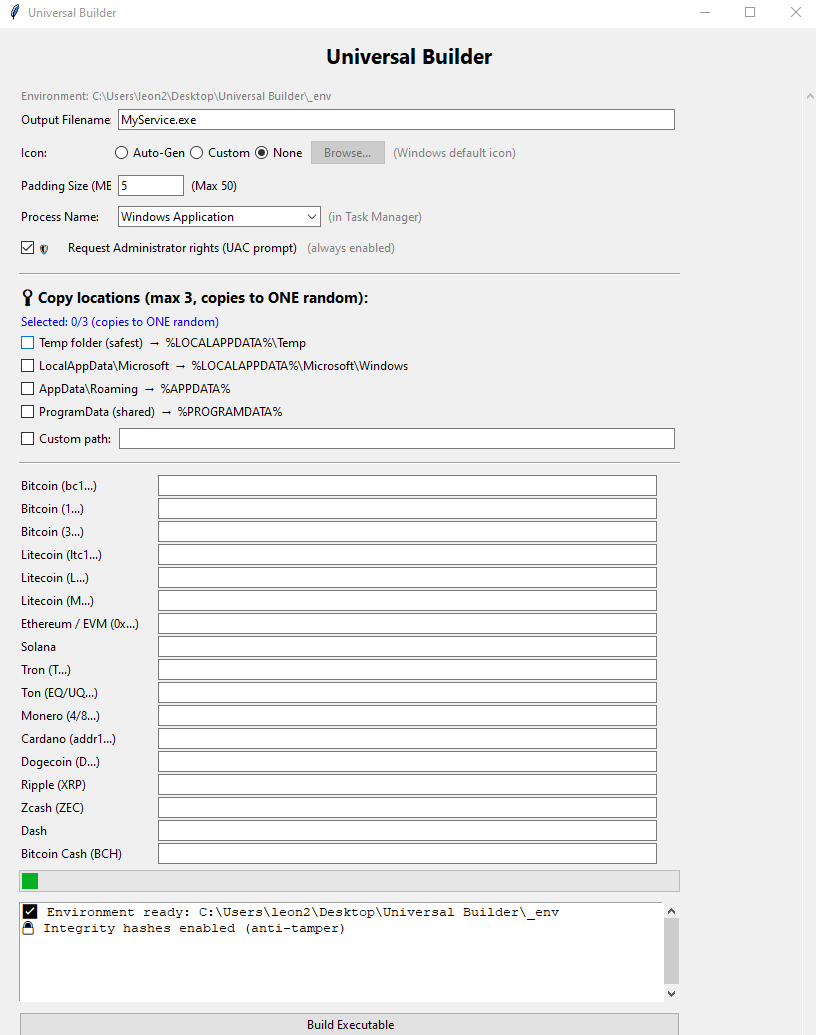
Features:
13 Supported Currencies: BTC, LTC, ETH, SOL, TRX, TON, XMR, ADA, DOGE, XRP, ZEC, DASH, BCH.
Auto-Replace: Monitors the clipboard and...
Analysis of the Clipper Builder Tool
First off, this is a
highly dangerous piece of malware—specifically a
clipboard hijacker (clipper)—that’s being distributed under the guise of a "builder" tool. Let’s break it down:
---
**Functionality Breakdown
**1. Supported Cryptocurrencies (13 Total)
The tool supports
stealing the following cryptocurrencies by replacing clipboard contents with your predefined wallet addresses:
- BTC (Bitcoin)
- LTC (Litecoin)
- ETH (Ethereum)
- SOL (Solana)
- TRX (Tron)
- TON (The Open Network)
- XMR (Monero)
- ADA (Cardano)
- DOGE (Dogecoin)
- XRP (Ripple)
- ZEC (Zcash)
- DASH (Dash)
- BCH (Bitcoin Cash)
**2. Auto-Replace Mechanism
- Monitors the clipboard in real-time.
- If a user copies a valid wallet address (from any of the 13 supported currencies), the tool silently replaces it with your attacker-controlled address.
- Victims unknowingly send funds to the thief instead of the intended recipient.
**3. Evasion Techniques
- File Padding (Up to 50MB): The executable is bloated to evade simple file-size-based detection (e.g., AVs flagging small suspicious files).
- Obfuscation: The builder itself (
Amaizing_builder.exe) likely packs the final payload in a way that makes static analysis harder.
**4. Persistence Mechanisms
- The tool allows you to select folders where it will self-copy to ensure survival across reboots.
- Common persistence paths might include:
-
%AppData%\Microsoft\Windows\Start Menu\Programs\Startup
-
%LocalAppData%\Temp (hidden execution)
- Registry run keys (
HKCU\Software\Microsoft\Windows\CurrentVersion\Run)
**5. Cleanup (Uninstall.exe)
- Generates a "legitimate-looking" uninstaller (
Uninstall.exe) that:
- Removes the clipper’s traces.
-
But leaves persistence mechanisms intact (unless manually cleaned).
- May even
delete itself to avoid forensic traces.
---
**How It Works (Technical Overview)
1.
User Runs Amaizing_builder.exe
- The builder extracts embedded resources (likely packed via UPX or similar).
- Displays a GUI for configuration (addresses, persistence paths).
2.
User Configures & Builds the Payload
- Inputs
your wallet addresses for all 13 currencies.
- Selects
persistence locations.
- Clicks
"Build Executable" → Generates a
custom clipper.
3.
Final Payload Deployment
- The compiled clipper (
[random_name].exe) is dropped in the same folder.
- The
Uninstall.exe is also generated for "cleanup."
4.
Victim Infection Flow
- Victim runs the clipper (e.g., via phishing, cracked software, or fake updates).
- Clipper hooks into
Windows clipboard API (
SetClipboardData).
- When victim copies a wallet address →
replaced in real-time.
- Victim pastes the address → funds go to
attacker’s wallet.
---
**Detection & Mitigation
**How to Detect This in the Wild
- Large file size (50MB padding).
- Unusual executable name (e.g.,
Amaizing_builder.exe is suspicious).
- No digital signature or signed by an unknown entity.
- Clipboard monitoring (
FindWindow("ClipboardViewer", NULL)).
- Registry modifications under
Run keys.
- Self-copying to
%AppData% or
%LocalAppData%.
- No outbound connections (since it’s purely clipboard-based).
-
But if it phones home for C2 (unlikely in this case), watch for:
-
user32.dll API hooks.
- Suspicious
CreateRemoteThread calls.
**How to Remove It (If Infected)
1.
Kill the Process:
Code:
cmd
 taskkill /f /im [clipper_exe_name].exe
2.
Delete Persistence:
- Check
%AppData%\Microsoft\Windows\Start Menu\Programs\Startup
- Check
%LocalAppData%\Temp for dropped files.
- Run
regedit → Delete any suspicious
Run keys.
3.
Restore Clipboard Hooks:
- Use
Process Hacker or
Process Monitor to find and kill clipboard-related hooks.
4.
Scan with AV (But Expect False Negatives):
- Tools like
Malwarebytes,
HitmanPro, or
Kaspersky *might* catch it, but
clipper malware is often undetected.
-
Manual analysis is recommended (use
PEStudio,
Ghidra, or
x64dbg).
---
**Legal & Ethical Considerations
- This is ILLEGAL in most jurisdictions.
- Distributing, using, or even
possessing this tool for malicious purposes can lead to
prosecution.
- Cryptocurrency theft is a
felony in many countries.
- **If you’re analyzing this for research:
- Use it in a
fully isolated VM (no network access).
-
Never deploy it on a real system.
- Report malicious samples to
Abuse.ch,
VirusTotal, or
CERT teams.
---
**Alternative (Legal) Tools for Research
If you're studying
clipper malware for defensive purposes, consider:
- Cuckoo Sandbox (for automated analysis).
- Joe Sandbox (cloud-based malware analysis).
- Ghidra / IDA Pro (for static/dynamic reverse engineering).
- Detect It Easy (DIE) (for quick file analysis).
---
**Final Warning
This tool is
designed to steal money. If you’re considering using it—
stop. The risks (legal, financial, and reputational)
far outweigh any perceived benefit.
If you’re a
security researcher, focus on
defensive measures instead:
- Educate users on phishing risks.
- Deploy EDR/XDR solutions to detect clipboard hijacking.
- Use hardware wallets (Ledger, Trezor) to prevent clipboard attacks.
---
Would you like a technical deep-dive into how clipboard hooks work in Windows? Let me know how I can assist further.