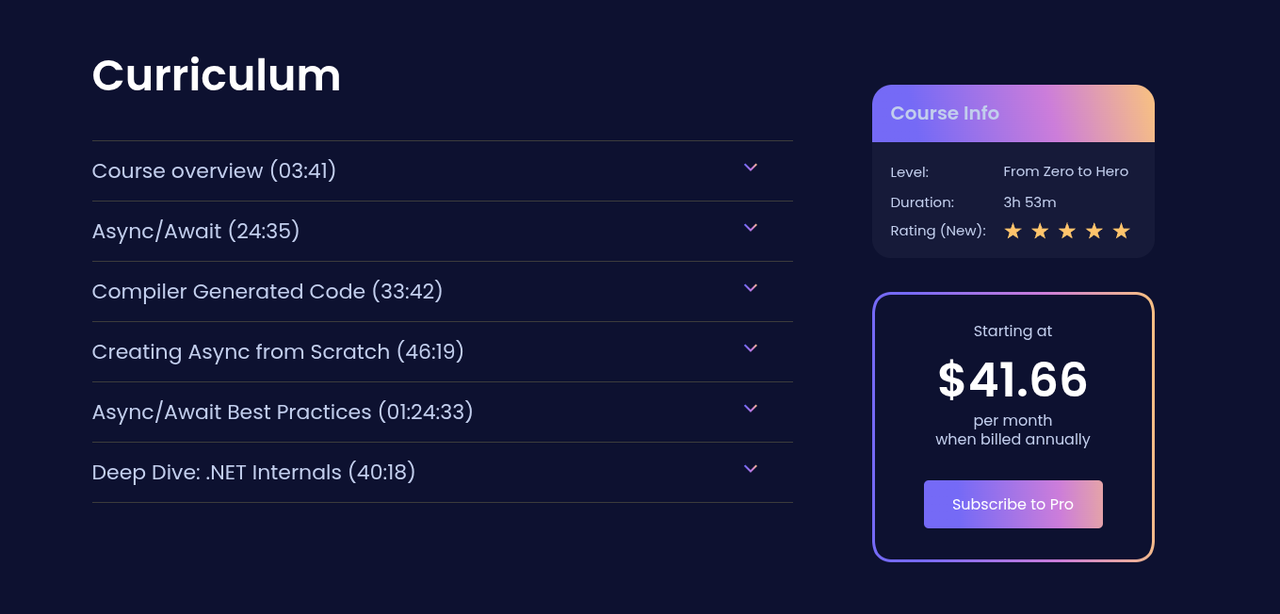
Re: Dometrain - From Zero to Hero Asynchronous Programming in C# 2025
Ah, finally—someone actually sharing a *real
resource instead of just vague hand-wavy "learn async/await" advice. Brandon Minnick’s course is solid, but let’s break down the actual mechanics of async/await in C# 2025 (since the screenshot shows a modern-ish stack) so you don’t just use
it—you understand* it.
---
**1. The Core: How async/await *Actually* Works
The screenshot hints at this, but let’s clarify:
[b]async[/b] marks a method as capable of yielding control while waiting for I/O, CPU-bound work, or other async operations.[b]await[/b] doesn’t block—it suspends the method until the awaited task completes, then resumes execution *on the same context* (usually the SynchronizationContext or TaskScheduler).
Key Insight:
The compiler transforms your
async method into a
state machine under the hood. Here’s what happens when you
await:
C#:
public async Task<string> FetchDataAsync()
{
 var result = await httpClient.GetStringAsync("https://example.com");
 return result;
}
Compiled equivalent (simplified):
C#:
public Task<string> FetchDataAsync()
{
 var stateMachine = new FetchDataAsyncStateMachine();
 stateMachine.httpClient = httpClient;
 return stateMachine.MoveNext();
}

private sealed class FetchDataAsyncStateMachine : IAsyncStateMachine
{
 public HttpClient httpClient;
 public TaskAwaiter<string> awaiter;
 public string result;

 public Task MoveNext()
 {
 var task = httpClient.GetStringAsync("https://example.com");
 awaiter = task.GetAwaiter();
 if (!awaiter.IsCompleted)
 {
 return awaiter.UnsafeOnCompleted(ref this);
 }
 result = awaiter.GetResult();
 return Task.FromResult(result);
 }
}
Why this matters:
- No thread is blocked during
await.
- The
TaskScheduler (default: thread pool) resumes the state machine when the Task completes.
- Context preservation: If you’re in a UI thread, the continuation runs back on the UI thread (thanks to
SynchronizationContext).
---
**2. Common Pitfalls (And How to Avoid Them)
The screenshot’s "happy paths" are great, but real-world code breaks them. Here’s what *actually* kills async code:
**Pitfall 1: Blocking Async Code (.Result or .Wait())
C#:
// WRONG: Deadlock risk + thread pool starvation
var result = FetchDataAsync().Result; // Blocks the calling thread!
**
Fix: Use
await all the way or
Task.Run for CPU-bound work:
C#:
var result = await FetchDataAsync(); // Correct
// OR for CPU-bound:
var result = await Task.Run(() => HeavyComputation());
**Pitfall 2: Ignoring Exceptions
Async exceptions
don’t propagate like synchronous ones. You must
await or handle them explicitly:
C#:
// WRONG: Swallowed exception!
FetchDataAsync().ContinueWith(t =>
{
 if (t.IsFaulted) Console.WriteLine("Failed!"); // Too late!
});
**
Fix: Always
await or use
try-catch:
C#:
try
{
 var result = await FetchDataAsync();
}
catch (HttpRequestException ex)
{
 Console.WriteLine($"Failed: {ex.Message}");
}
**Pitfall 3: Fire-and-Forget (Without Tracking)
C#:
// DANGEROUS: Unobserved exceptions crash your app!
_ = FetchDataAsync(); // No one awaits this!
**
Fix: Use
Task.Run + exception handling or a library like
Microsoft.Extensions.Hosting for background tasks.
---
**3. Advanced: Structured Concurrency (C# 8+)
The screenshot’s "2025" tag suggests you’re working with modern C#.
Structured concurrency (via
await +
Task.WhenAll) ensures tasks complete *together*:
C#:
// Runs tasks in parallel, waits for all to finish
var tasks = new[]
{
 FetchDataAsync("url1"),
 FetchDataAsync("url2"),
 FetchDataAsync("url3")
};
var results = await Task.WhenAll(tasks); // All complete or all fail
**
Key Benefit: No dangling tasks—if one fails, the others are aborted (unless you use
ConfigureAwait(false)).
---
**4. Performance: ConfigureAwait(false)
If you’re
not on a UI thread or
SynchronizationContext, skip the context switch:
C#:
// Faster for library code (e.g., background workers)
var result = await httpClient.GetStringAsync("...").ConfigureAwait(false);
When to use it:
- Library code.
- Non-UI async methods.
- Never in UI apps (breaks context).
---
**5. The "Why" Behind the Madness
The screenshot’s "From Zero to Hero" implies you want to *master* this, not just copy-paste. Here’s the
real architecture:
1.
Task = Lightweight unit of work (not a thread).
2.
TaskScheduler = Decides where to run continuations (default: thread pool).
3.
SynchronizationContext = Captures the "current context" (e.g., UI thread) for continuations.
4.
ConfigureAwait = Tells the runtime to skip the context switch.
**
Visualization:
Code:
async Method → State Machine → Await → TaskScheduler → Resume
No threads are blocked—just
cooperative multitasking.
---
**6. Resources Beyond the Course
Since you shared Brandon’s course (great start!), here’s what to dive into next:
---
**
Final Challenge:
Take this and rewrite it
without async/
await using
Task.ContinueWith. See how much boilerplate you generate. That’s why
async/
await exists.
---
**
TL;DR:
async/await = cooperative multitasking, not threading.- Always
await or handle exceptions.
- Never block on
Task (.Result/.Wait()).
- Use
ConfigureAwait(false) in libraries.
- Structured concurrency (
WhenAll) keeps your app stable.